Lightning Web Component : lightning-record-view-form A lightning-record-view-form component is a wrapper component that accepts a record ID and is used to display one or more fields and labels associated with that record using lightning-output-field . lightning-record-view-form requires a record ID to display the fields on the record. It doesn't require additional Apex controllers or Lightning Data Service to display record data. This component also takes care of field-level security and sharing for you, so users see only the data they have access to. Displaying Record Fields : To display the fields on a record, specify the fields using lightning-output-field. Attributes: NAME ACCESS ...
Posts

Lightning Web Component: lightning-record-form A lightning-record-form component enables you to quickly create forms to add, view, or update a record. Using this component to create record forms is easier than building forms manually with lightning-record-edit-form and lightning-record-view-form . However, lightning-record-form does not support client-side validation quite the same as lightning-record-edit-form . The object-api-name attribute is always required, and record-id is required if you are editing a record. NOTE: this component take cares of field-level security and sharing for you, so users will only see the data that they have access to. Modes This component accepts mode value that determines the user interaction determine for them. The values can be one of the following: a. edit : Creates an editable form to add a record or update an existing one. When updating an existing record, specify the...

Salesforce Connect Salesforce connect is a framework that enables you to view, search and modify data that's stored outside your Salesforce org. Instead of extracting and copying that data into your org using ETL tool, we can use external objects to access that data real time using web-service callouts. Salesforce recommend to use Salesforce Connect if You have large amount of data that you don't want to copy into your Salesforce org. You need small amount of data at any one time. You need real-time access to the latest data. You store your data in the cloud or in a back-office system, but want to display or process that data in your Salesforce org. External Objects: External objects in Salesforce are similar as custom objects but they are mapped to data located outside your Salesforce org. Each of the external object’s fields maps to a table column on the external system. External objects enable users to search and interact with the external data. Each or...

SOQL Injection A SOQL injection consists of insertion or injection of SOQL query via the input data from client to application. A successful SQQL injection exploit can read sensitive data from the database. Below is the example of Apex and Lightning Component code vulnerable to SOQL injection. Now enter name existing contact name and click on search button to see the result, in my case I search for contact whose Name contains 'Winter'. Now in search box enter " winter%' OR Name LIKE ' " and click on search button to all contact records. How to prevent SOQL injection? 1. Static Query: To prevent SOQL injection attach, avoid using dynamic SOQL queries. Instead, use static queries and binding variables. 2. Escaping Single Quotes: use of string.escapeSingleQuotes() method arounf variable function escapes any instance that it finds of a ‘ quote in the string using the backslash (\) escape character. This prevents an attacker’s input from...

lightning:map component lightning:map introduced in winter 19 which can be use display a map of one or more locations using Google Maps. We can pass markers to the component to define the locations to map. A marker can be a coordinate pair of latitude and longitude, or a set of address elements: City, Country, PostalCode, State, and Street. This component requires API version 44.0 and later. lightning:map has required attribute mapMarkers which accepts array of markers that indicate location. A market contains Location information: This can be a coordinate pair of latitude and longitude, or an address composed of address elements. Descriptive information: This is information like title, description and an icon which is information relevant to the marker but not specifically related to location. Example Create a new Object called 'Tower' with two new custom fields 1. Field Label: State Type: Master-Detail (Account) 2. Field Label: Locati...

Inherited Sharing in Apex Inherited Sharing is available with Salesforce Winter'19 release. Use Inherited sharing keyword on apex class which allows the class to run in sharing mode of class that called it. Inherited sharing ensures that our apex code is not used in unexpected or insecure way. An Apex class with inherited sharing runs as with sharing when used as a Visualforce page controller, Apex REST service, or an entry point to an Apex transaction. If the class is used as the entry point to an Apex transaction, an omitted sharing declaration runs as without sharing. However, inherited sharing ensures that the default is to run as with sharing. A class declared as inherited sharing runs only as without sharing when explicitly called from an already established without sharing context. Example: We have declares Apex class with inherited sharing and a visualforce invocation of that Apex code. Because of the 'inherited sharing' declaration, only contacts for which...
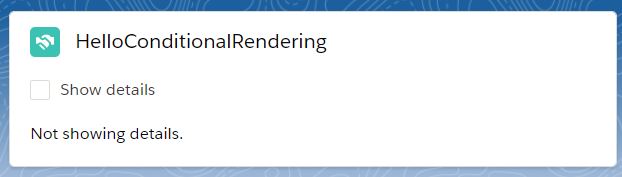
Lightning Web Component: Render elements conditionally to render HTML conditionally we will use if:true|false directive. Directives are special HTML attributes that add dynamic behavior to HTML templates. below are the list of directive: 1. for:each={array} : use this directive to iterate over an array and render a list. 2. for:item= "currentItem" : Use this directive to access th e current items where currentItem is an identifier that model injects into the current scope. 3. for:index="index" : Use this directive to access the current item's zero-based index where index placeholder is a new identifier that the model injects into the current scope. 4. if:true|false={expression} : Use this directive to conditionally render DOM elements in a template. The expression can be a JavaScript identifier (for example, person) or dot notation that accesses a property from an object (person.firstName). The engine doesn’t allow computed express...